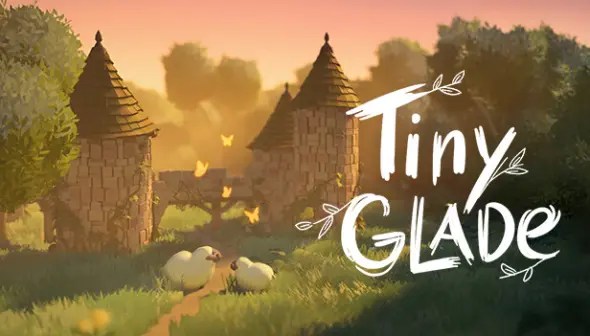
Tiny Glade, even in its demo stage, offers a deceptively deep sandbox for creative builders. But it can take time to see past the initial simplicity and discover just how flexible the game’s mechanics really are. Whether you’re feeling boxed in by the small map or simply unsure how to take your builds to the next level, this set of tips is designed to help you get more out of your creative time in Tiny Glade—and maybe even fall in love with the tools all over again.
1. Break the Habit of Symmetry
One of the most impactful changes you can make in your building approach is to abandon symmetry. While symmetry can feel safe and polished, it often lacks character. Tiny Glade rewards unconventional design—slightly uneven rooftops, asymmetrical building placement, or organically shaped villages feel more natural and lived-in. The game’s terrain manipulation features only amplify this, letting you build structures into slopes or nest them into cliffs in ways that make them feel like they belong to the environment.
Shop now on Amazon!
Save up to 50% on top Gaming Gear:
Gaming Headset
Gaming Mice
Mechanical Keyboards
Game Controllers
Gaming Chair
2. Embrace Stairs and Elevation
Many players initially miss how to create stairs in Tiny Glade. It’s simpler than it looks—just draw a path up to a raised surface, and the game generates stairs automatically. This works not only for buildings but also for terrain, cliffs, and raised rocks. With the limited space in the demo, vertical design becomes critical. Use cliffs to give your structures new perspectives, hang buildings off ledges, or bridge uneven terrain. These vertical connections not only optimize space but also lend dramatic flair to your settlements.
3. Build Up, Not Just Out
Given the compact building area in the demo, vertical building is essential. Think in layers—stack towers, extend rooftops into balconies, and allow terrain to guide elevation. Building on and around cliffs makes the most of limited space while giving your builds striking silhouettes. You’ll often find that the most dynamic and visually engaging builds are the ones that play with verticality, whether it’s a tower nestled against a rock face or a winding path that snakes up to a lofty overlook.
4. Know Your Controls: Left Click Unlocks More
It may seem basic, but understanding the control scheme fully is key. Left-clicking a structure brings up all the adjustment options—roof shapes, wall positions, and base height manipulation. It’s easy to miss early on, but mastering this interface lets you unlock the full customization potential of each piece.
5. Start with a Theme or Story
Random building has its charm, but going in with a narrative or visual theme can transform your entire approach. Whether you’re recreating a scene from a show or crafting a setting from your imagination, having a central idea—like a forgotten fortress, cozy hillside chapel, or cliff-side hamlet—grounds your creativity and leads to more cohesive results. Even if you’re just borrowing a general vibe, a themed approach gives every placement purpose.
6. Build Around a Focal Element
When you’re stuck, zoom in on one thing. A path, a boulder, a tower—anything can serve as the anchor point for a whole scene. Instead of scattering elements randomly, try building outward from a central street or rock formation. Let buildings wrap around it, fences connect to it, and terrain mold itself to it. This technique gives your layout an organic shape and helps avoid the disconnected, patchy feeling of aimless construction.
7. Layer the Terrain for Better Flow
Terrain sculpting is one of Tiny Glade’s most underutilized features. Creating hills, dips, and slopes isn’t just cosmetic—it changes how your buildings sit, how your paths form, and how your whole environment feels. A modest cliff can host a hanging house or a tiered settlement. Smooth inclines can allow gentle paths and natural staircases. Get comfortable adjusting terrain both before and after placing buildings—it adds complexity without requiring extra tools.
8. Stack Buildings Seamlessly
You can create multi-tiered structures by cleverly layering buildings. Instead of stacking them plainly, place one inside the other at different heights. Done properly, the seam between them disappears, and you get the illusion of one continuous structure. Try embedding a round tower into a rectangular house to create a church spire or a lookout. Use different materials or textures for contrast or to mimic architectural variation. The illusion works surprisingly well with a little finesse.
9. Rethink What Buildings Are For
Buildings in Tiny Glade aren’t limited to being houses. Once you start seeing them as shapes instead of structures, the possibilities open up. A flat-roofed house can be a courtyard or stage. A tower becomes a monument. A fence piece turns into a statue. By repurposing shapes, you go from traditional layouts to more imaginative forms. This mindset shift turns every tool into a multipurpose asset.
10. Practice Makes Progress
Like any creative toolset, mastery comes with playtime. Your early builds might feel underwhelming, but don’t let that stop you. Every new attempt reveals a new trick—how lights cast at night, how windows change form, or how terrain affects visuals. Even the limited toolset in the demo offers deep experimentation. The more you tinker, the more expressive your builds become.
Tiny Glade may be in demo form, but its creative ceiling is already remarkably high. By focusing on asymmetry, layering, and story-driven design, you can transform the small map into something rich with atmosphere. Whether you’re building a crumbling fortress, a cozy cliffside village, or a magical retreat in the hills, there’s always more to discover—one rock, path, or misplaced fence at a time.



 My Gaming Tutorials
Leave a comment